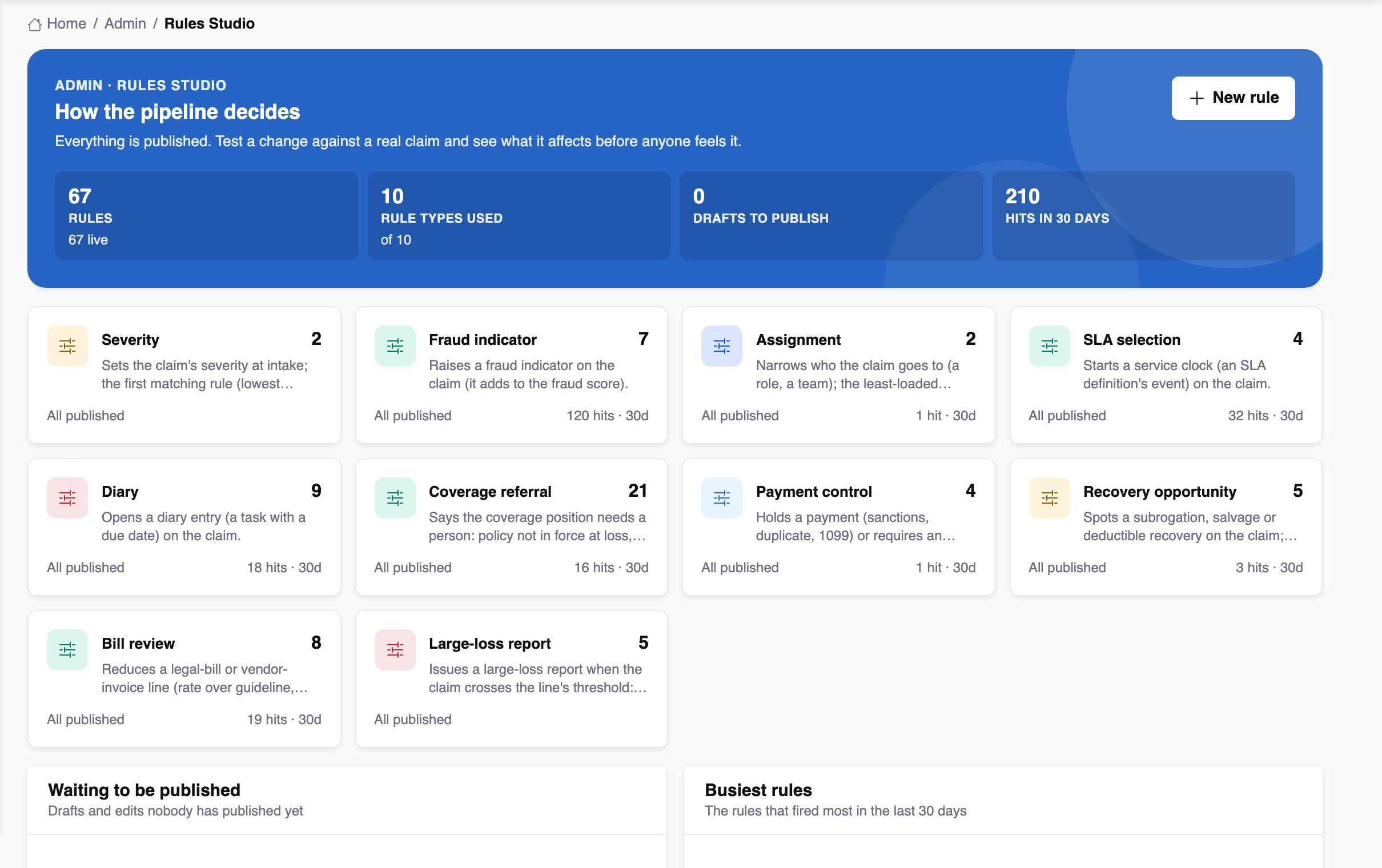
Every claims operation runs on rules: which claims are high severity, who gets which line, which clocks start, which payments need a second look, when a fraud indicator fires. In most organisations those rules are buried in vendor configuration or live in a supervisor's head. The Rules Studio puts them where a claims manager can read them, test them and change them.
The claims rule types
| Type | What it decides | When it runs |
|---|---|---|
| Severity | Low, medium, high or critical | Claim opened |
| Fraud indicator | Raises an indicator with a weight | Claim opened, Analyze |
| Assignment | The role or team a claim goes to | Claim opened |
| SLA selection | Which clocks start | Claim opened |
| Diary | Opens a diary with a due date | Claim opened |
| Coverage referral | Refers the coverage position, or requires an approval | Claim opened, Analyze |
| Payment control | Holds a payment, or requires an approval | Payment requested, issued |
| Recovery | Raises a subrogation, salvage or deductible opportunity | Analyze, liability recorded |
| Bill review | Cuts a legal or vendor bill line with a reason | Bill received |
| Large loss | Issues the large-loss report and reinsurers' notice | Incurred crosses a threshold |
Line rules sit in the same Studio, predicated on the line: claims-made checks for management liability, sanctions and sublimit checks for cyber, coinsurance and ALE for property, long TTD for workers' comp, rental over limit for auto.
A rule is a sentence
Each rule reads as English — “When line is workers' comp → assign to the Workers Comp team” — built from the catalogue's labels, never a field key. Underneath it is declarative JSON that the same shared engine evaluates in every Insight product.
one real claim"] B --> C["Impact: which open
claims would change"] C --> D{"Publish?"} D -->|"yes"| E["New version;
the next Analyze
uses it"] D -->|"no"| A E --> F["Roll back from
the history"] style D fill:#e8f8f4,stroke:#22c1a4,stroke-width:2px
Saving keeps a draft. Testing runs it against a real claim and shows which conditions held, with the claim's actual values. Impact shows what the unsaved draft would change across open claims, by line and stage, with examples. Only publishing changes what the pipeline does, and decisions already made do not change.
Who owns which rules
- Claims operations: severity, assignment, clocks and diaries.
- Coverage leads: coverage referrals and the line checks.
- SIU: the fraud indicator catalogue and its weights.
- Compliance and finance: payment controls.
- Litigation and vendor management: bill review guidelines.
- Leadership and reinsurance: large-loss thresholds.
Every rule fire is logged with the claim and the facts, and lands on the decision record. That is how a rule owner learns whether a rule earns its place.